Self Hosted Overlay Network
homelab selfhostingThe Problem
Putting aside that most residential ISP agreements bar you from serving content – though I’ve never experienced any ISP enforcing that rule – one of the problems of self-hosting is having to expose services to the Internet that you really only intend to use for yourself. Reducing the attack surface becomes necessary after a while; AI bots, crawlers, and constant break-in attempts will have you scrambling for cover if you’re paying attention. Most residential Internet plans are set up with a firewall and NAT; your local machines are on a private network, and all your Internet traffic is translated to and from the public address space so one on the Internet can see your services. While you’re glad to have your services behind your firewall, you are not always behind it, and probably need a way to punch a way through to provide from-anywhere access for yourself.
Old Solutions
The historic solution for this has been self-hosting a “traditional” VPN; I was fond of OpenVPN for this but as of a few years ago there were lots of solutions. They basically work like this:

Aside: most of the commercial VPNs you always see advertise work the same way, except the exit node is on someone else’s network instead of your own, often in a geolocation you can choose, and the point is to semi-anonymize your traffic from the perspective of your carrier networks so you can watch pornography from Utah or the NFL from Zimbabwe. Some have value-adds like ad blocking, and identity provider integration.
This solution, while it works, has several downsides:
-
Hairpin traffic. For convenience, you want the client to be always on, but when you’re at home, the traffic is going out and right back in, which is inefficient and can be costly, depending on your plan. You find yourself turning the client off and on again.
-
Performance. For various reasons I won’t get into, older-style VPN protocols, particularly those used by OpenVPN but also others, have efficiency problems. They come from older decisions that don’t necessarily align well with modern operating system and network setups.
-
Mobility. When roaming, the stateful nature of VPN “connections” is a nagging problem. I’ve not seen it completely solved in a satisfactory way on OpenVPN or even more mainstream commercial VPNs that you get for the exit node (e.g. ExpressVPN).
New Solutions
Newer solutions have been built around Wireguard, a newer protocol that, coupled with some other techniques (STUN/DERP), addresses most of these problems. Together they could be generically be called “Wireguard Overlay Networks”… they’re a kind of VPN but they are architected a bit differently than traditional VPN protocols. The basic idea is that instead of encrypting and funneling all your firewall-crossing traffic through a single persistent connection, you instead have all the nodes register with a third party and share their current disposition - where they are, what the firewalling/NAT is like, and their public encryption keys.
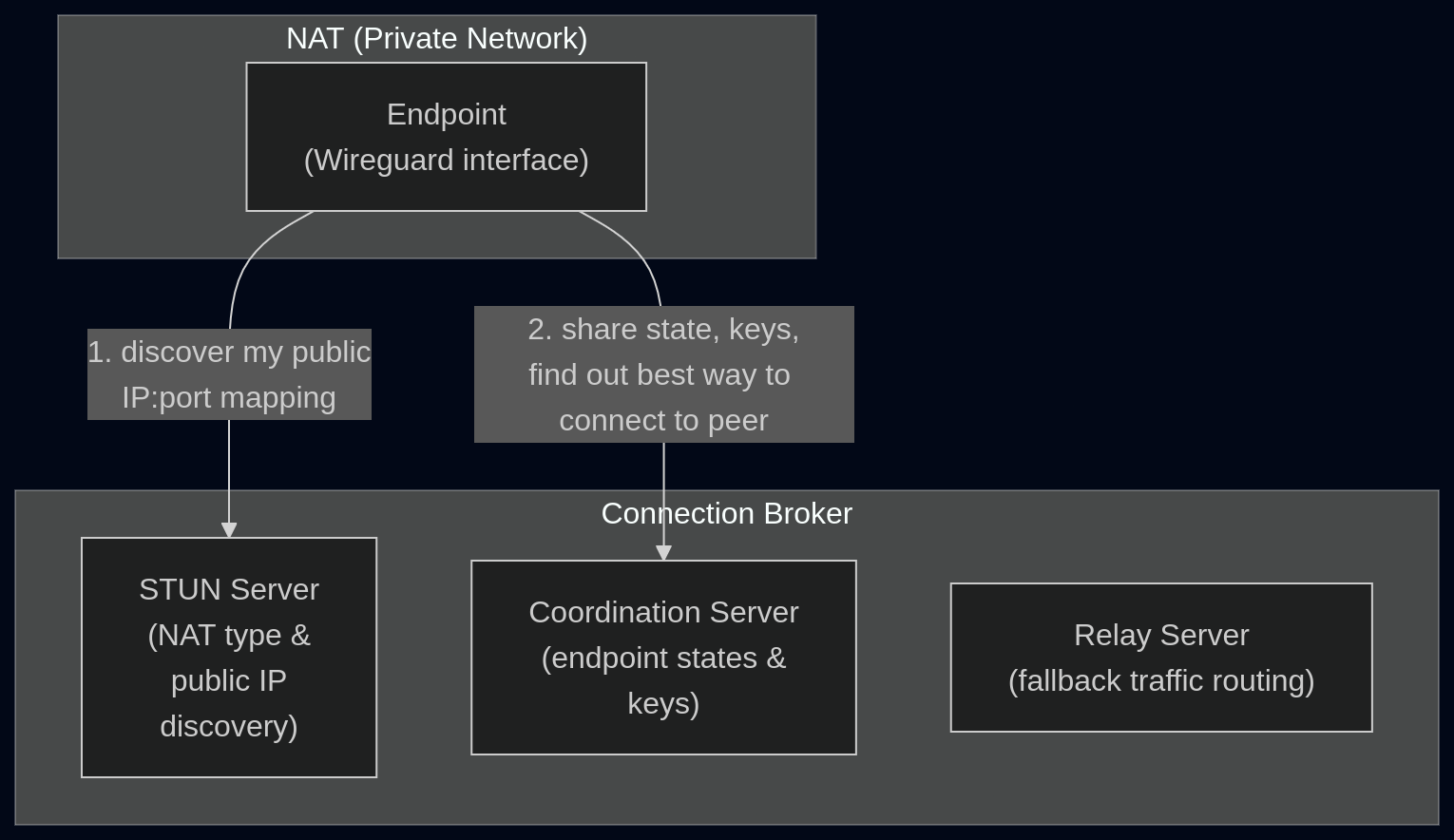
The negotiation shown here, performed across many endpoints, establishes an an overlay network: an association of endpoint devices, their keys, and the best way for them to get to each other. What you get as a user experience here is a connection to your private apps that feels seamless, with the traffic being routed via the shortest available path; either directly (if on the same network), through NAT (through mutually negotiated public addressing), or through the DERP relay server as a fallback. The packets are all encrypted solely for the destination endpoint; they can’t be deciphered by the relay or other mediating carriers. And the best part is that none of this even needs any persistent infrastructure; since the connections are brokered by a third party to connect your endpoints directly, a third-party SaaS can take care of the connection brokering. You just have to install the software to all the endpoints you want to connect together. Tailscale is the product people are most familiar with at the time of writing.
Self-Hosting
Of course, we are self-hosters here and don’t want to use a SaaS, even if it’s “just” for connection brokering. Some of Tailscale’s clients are open source and free; only the third-party connection broker is proprietary. As it turns out, people (starting with a Tailscale employee) have worked on providing an open alternative to this missing piece, called Headscale.
Constraints
These are just my constraints: yours might differ.
- VPS available for light/stateless work
- as many components as possible should live behind NAT (self-hosted state, backups, monitoring, k8s, low-cost resiliency)
- standard Tailscale clients should work
- no SSO needed, occasional auth maintenance is fine
- access internal/private services through tailscale by their pre-existing names
- solution should be self-contained; no third-party infra
- only the LAN subnet should be accessible; no routing to any cluster subnets
- no inbound router holes or PAT configuration
This will let me completely get rid of my old VPN without exposing more services directly to the public, in a way that’s more or less self-contained.
Architecture
Most of this is installable on a (self-hosted) Kubernetes cluster, or any home Linux machine:
Headscale has a container image which can serve a coordination server and embedded DERP at /derp. An SSH reverse proxy can wire up the Headscale servers to the VPS reverse web proxy (e.g. nginx). Tailscale’s Linux client can act as a subnet router (analogous to the traditional “Exit Node”), granting access to the local service subnets but, in my case, not the Kubernetes internal subnets.
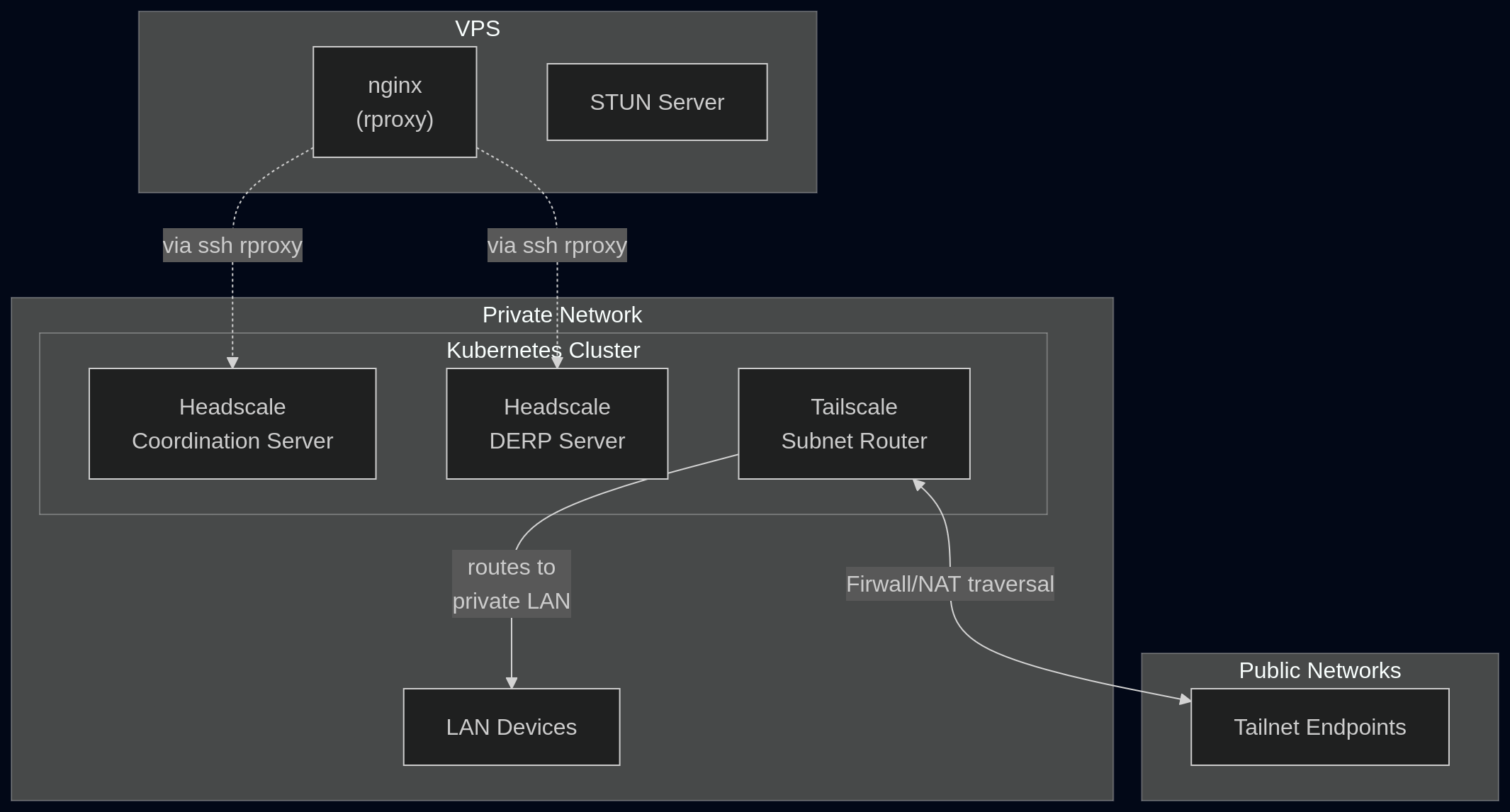
A STUN server also comes with the Headscale DERP server but proxying it would be complicated due to the need to re-address proxied UDP packets. Since STUN is stateless and does not directly coordinate with the other servers, it can simply be served directly on the VPS. The embedded internal STUN will go unused. I used coturn to install this on my VPS.
A manual, periodic step is required to register the subnet router as a server client. This generates a preauth key to be fed as a secret to the subnet router tailscale:
headscale preauthkeys create --tags tag:router --reusable --expiration 90d
Once the subnet router tailscale is running, another manual step is needed to authorize the subnet route it advertises:
headscale nodes routes  # to list the routes and find the id
headscale nodes approve-routes -i [id] --routes [route]
Once this is done, endpoints on the overlay net will be able to access the subnet route advertised by the subnet router tailscale client. So I installed the official Tailscale clients on my mobile user endpoints (laptops, tablets, phones) and connected them all to the overlay net. This involves more running of headscale commands via kubectl exec on the Headscale server. There are two workflows:
- Generating preauth keys to feed into the Tailscale clients
- Registering each device via a registration key surfaced in the Tailscale app upon first connection
For me this is suffciently low-maintenance but YMMV.
Components
VPS:
- nginx + an rproxy config
- coturn (STUN server)
The rproxy config is pretty standard but note that it has to force a connection upgrade via headers. For nginx add this to the relevant location block:
proxy_http_version 1.1;
proxy_set_header Upgrade $http_upgrade;
proxy_set_header Connection "upgrade";
Kubernetes:
- Namespace
- ServiceAccount for the tailscale subnet-router deployment
- RBAC Role and RoleBindings for the ServiceAccount (to allow subnet-router to save sensitive state in secrets)
- Secret to store the subnet-router and optional user preauth keys passed via env
TS_AUTHKEY - ConfigMap (example config shown below)
- Deployment
- tailscale as a subnet router;
NET_ADMINandNET_RAWcapabilities in a privileged container, running as svc account - autossh for maintaining the ssh tunnel to the VPS (because I don’t do PAT/router config)
- tailscale as a subnet router;
- Service in-cluster, for exposing the coordination server to the autossh tunnel
- StatefulSet running headscale
- PVC/PV for the StatefulSet to store the sqlite db (postgres is deprecated)
I don’t have plans to release a Helm chart for this but I do have an example Headscale config where most of the important details are:
server_url: https://headscale.example.com
listen_addr: 0.0.0.0:8080
metrics_listen_addr: 0.0.0.0:9090
grpc_listen_addr: 0.0.0.0:50443
grpc_allow_insecure: false

private_key_path: /var/lib/headscale/private.key
noise:
  private_key_path: /var/lib/headscale/noise_private.key

prefixes:
  v4: 100.64.0.0/10
  v6: fd7a:115c:a1e0::/48

database:
  type: sqlite
  sqlite:
    path: /var/lib/headscale/db.sqlite

derp:
  server:
    enabled: true
    region_id: 999
    region_code: "headscale"
    region_name: "headscale embedded DERP"
    verify_clients: true
    # NOTE: this never gets contacted; STUN is stateless and run on the edge
    #       it only needs to be on the same public IP as DERP
    stun_listen_addr: "0.0.0.0:3478"
    private_key_path: /var/lib/headscale/derp_server_private.key
    automatically_add_embedded_derp_region: true
    # public IPs of DERP/STUN
    ipv4: [VPS IPv4 address]
    ipv6: [VPS IPv6 address]
  # empty URLs is fully self-contained. no public DERP/STUN infra
  urls: []

dns:
  magic_dns: true
  base_domain: .local
  nameservers:
    global:
      - [upstream DNS server]
    split:
      local:
        - [local DNS server]

log:
  level: info

policy:
  mode: database

unix_socket: /var/lib/headscale/headscale.sock
unix_socket_permissions: "0770"